
Electronic Accounts Receivable Data Contribution
Turn your monthly accounts receivable data into a valuable credit-management resource for your company and the NACM member community.
NACM South Atlantic makes electronic A/R data contribution straightforward. Export your customer aging information from your accounting system and send it to NACM in a standard electronic format. Our team will help verify the initial file structure and data mapping before regular monthly reporting begins.
Why Contribute Your Accounts Receivable Data?
Business-to-business credit professionals make credit decisions every day, often extending substantial unsecured trade credit to customers.Current payment experience provides valuable insight into how businesses are meeting their obligations.
By contributing your monthly A/R aging information, you help strengthen the NACM National Trade Credit Report while gaining access to credit-management tools that can help your own organization identify risk and manage receivables more effectively.
More Than Simply Reporting Payment History
Electronic data contribution can reduce manual credit-reference work while providing additional tools for monitoring customer risk.
National Trade Credit Report
Help strengthen the payment-history information available to NACM members making business credit decisions.
Portfolio Risk Analysis
Data contributors may receive access to tools designed to help identify changes and potential risk across an accounts receivable portfolio.
Account Monitoring
Monitor customer accounts for meaningful changes that may warrant additional credit review or attention.
Fewer Manual References
Making payment experience available through NACM credit reports can help reduce repetitive telephone, email, and fax credit-reference requests.
Four Simple Steps
Export Your A/R Aging
Generate a customer aging file from your accounting or accounts receivable system.
Send NACM a Sample File
NACM reviews the file structure and determines how your fields correspond to the NACM reporting format.
Verify the Mapping
A sample load allows you to confirm that balances and aging buckets such as Current, 30, 60, 90 and 120 days are mapped correctly.
Submit Monthly
After verification, send the same file format each month. Automated contributors may also arrange FTP file transfer with NACM.
Download the Data Contribution Guide
Our Data Contribution Guide provides a convenient one-page reference showing the recommended customer fields, acceptable file layout, common questions, and monthly submission inhformation.
Download or print a copy for your credit department, accounting department, IT staff, or anyone responsible for producing your monthly accounts receivable export.
Customer identification, balances and aging information
See the correct single-line record format
Answers to common contribution questions
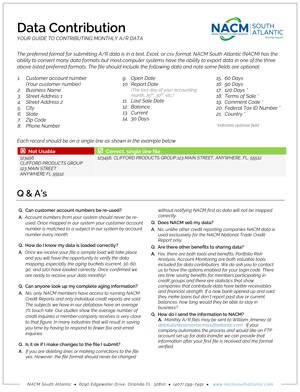
Data Contribution Guide — click the image to view the printable PDF.
Preferred Electronic File Formats
Most accounting systems can export accounts receivable information
in one of the following formats:
Text File
Microsoft Excel
Comma-Separated Values
One Customer Record Per Line
Each customer must occupy one complete row or line in your data file.
Do not place the customer number, company name, street address, city, state or ZIP Code on separate lines. Those values are individual fields belonging to the same customer record.

123456, CLIFFORD PRODUCTS GROUP, 123 MAIN STREET, ANYWHERE, FL, 55512
Recommended Accounts Receivable Fields
Each customer record should contain the available identifying and aging information shown below. Fields marked Optional are not required.
Customer Account Number
Business Name
Street Address Line 1
Street Address Line 2
City
State
ZIP Code
Phone Number
Open Date
Report Date
Last Sale Date
Balance
Current
30 Days
60 Days
90 Days
120 Days Optional
Terms of Sale Optional
Comment Code Optional
Federal Tax ID Number Optional
Country Optional
Important: Do Not Reuse Customer Account Numbers
Your customer account number becomes an important part of the monthly matching process. Once an account has been mapped to a business in the NACM system, that account number should not later be assigned to a different customer.
Electronic Data Contribution FAQ
How do I know my data loaded correctly?
NACM performs a sample load of your initial file. You will have an opportunity to verify the field mapping and confirm that the Current, 30, 60, 90 and 120-day aging buckets were loaded into the appropriate categories before regular monthly reporting begins.
Can I make corrections to the file before sending it?
Yes. Individual rows may be corrected or removed when appropriate. However, once your file format has been mapped by NACM, the structure of the file should remain consistent.
Please contact NACM before adding, removing, rearranging or changing columns so that your data continues to map correctly.
Does NACM sell the accounts receivable data I contribute?
Contributor data is used exclusively for the NACM National Trade Credit Report rather than being sold as a separate contributor database.
Who can access the credit information?
NACM National Trade Credit Reports are available to NACM members. Individual business credit reports provide relevant payment experience for the company being reviewed rather than giving another company unrestricted access to your complete accounts receivable database.
How often should we submit our data?
Accounts receivable information should normally be submitted monthly using the same verified data layout.
How do we send the monthly file?
Monthly A/R files may be sent to datasubmission@nacmsouthatlantic.com. Companies automating their monthly reporting may also arrange for an SFTP transfer after the initial file format has been received and verified.
Send Us Your First A/R File
Contact NACM South Atlantic before submitting your initial file. We’ll review the format, verify your data mapping, and help establish a reliable monthly contribution process.

